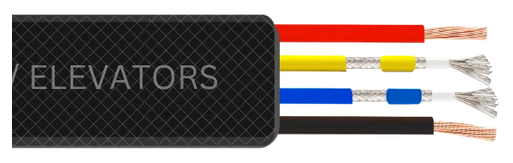
Channeltech 2+2 Flat: the flat lift cable for HD cameras (CC-9511K-90)
What a 2+2 flat elevator cable is, how Channeltech's 2+2 Flat is built, which cameras it suits, and how it compares with 3+1 CCTV cable in a lift well.
The Channeltech 2+2 Flat, part code CC-9511K-90, is a flat elevator cable for HD, AHD, HD-CVI, HD-TVI and analog cameras in lifts. It carries the picture and the camera's 12 V supply in one flat, flexible, FRLS cable. Channeltech was the first in India to make a flat 2+2 lift cable for HD cameras.
What 2+2 means
Two video cores plus two power cores. The video cores are multi-strand tinned copper with LDPE insulation; the power cores are multi-strand copper. All four sit side by side in a black, flexible FRLS PVC flat jacket. One cable therefore does the work of a video cable and a power cable, with one clamp and one pull.
Why a flat 2+2 and not a round cable
A camera in a lift cabin moves with it, so the cable flexes on every trip. Round cable has no fixed plane to hang in and twists in the loop; a flat cable hangs in one plane and bends across its thin axis only. Stranded conductors share the bending between strands. Tinned copper on the video cores protects the fine strands from oxidation over years of flexing and humid lift wells.
2+2 Flat compared with 3+1 CCTV cable
3+1 cable is a round cable made for fixed runs: three coax cores and one power core. It is the cable most installers already carry, which is why it often ends up in the lift well. It was not built for continuous flexing, and it fails at the flex point after a time, often as a flicker that only appears when the lift is moving. In a lift well the 2+2 Flat is the travelling-cable choice; use 3+1 only for the fixed run from the DVR to the junction box.
Which cameras it suits
Any camera that connects to a DVR: HD-TVI, AHD, HD-CVI and older analog cameras, with BNC video and a 12 V DC supply. For IP cameras that connect to an NVR, use the Channeltech CAT6 Flat 4 Pair instead.
Power: check the 12 V drop
The 12 V supply goes down one power core and returns on the other, so the effective length is twice the cable length. For the cable run you actually have, calculate the voltage drop at the camera's current and keep the camera within its supply tolerance. If the supply is in the machine room, consider a local supply nearer to mid-height. Where the drop is a problem, ask for the datasheet values for the power cores.
Terminating it
Use compression BNC connectors on the video cores and ferrules or screw terminals on the power cores. Never push stranded cores into a spring terminal made for solid wire. Keep every joint out of the moving loop. The full sequence is in the installation guide.
How it is supplied
As a 180 m continuous coil (90 m + 90 m), cut in the middle if you need 90 m. Cut each lift from the coil as one piece so there is no joint in the moving part. The calculator turns floors into coils.
Moving to IP later
If the building is moving to IP cameras, put the CAT6 Flat 4 Pair in at the next opportunity; one cable then carries data and PoE. Until then the 2+2 Flat keeps the existing HD cameras running reliably.